Coming Soon: GDI Team Bonus

At GDI, we believe in rewarding you for your hard earned success. We do this in the way of commissions and payouts for our individual affiliates. But sometimes that success takes a whole team. That’s why we are happy to now offer a GDI Team Bonus. The bonus will reward a team of affiliates for the total number of signups they bring in during a set month. Each month teams are paid out a bonus of $250 per 25 signups with multipliers (up to triple!) available based on number of people in a team, number and distribution of referrals, and Premium referrals. Each team member with a referral gets an equal share of the payout.

You can multiply your earnings based on achieving certain combinations of converted signups throughout your team.  These multipliers can TRIPLE your earnings!

This bonus also gives you a chance to work with someone new or stick with team members you already know. That’s because you get to pick your own team. You can build a team yourself or join one someone else has created. Teams do not have to follow your current downline or upline.

An official announcement and full details of this new Team Bonus are coming soon. In the meantime, think about who you might like to have on your team. Best of luck!
Your Winning Advice: Round Three

This holiday season we’ve been asking for your advice. The GDI Big Tippers Contest launched at the beginning of November and offers 2 more chances to win $100. We just finished our third round and announced our winner, Aaron Mecua! We want to take this opportunity to share his advice and share GDI’s take on it. Don’t forget to enter for your chance to win by sharing your advice on our Facebook Page or tweeting us with it.

Most people join the program because of the opportunity, so what I do is share the bonuses that the program offers and walk my sign ups through it. Then explain to them that these are just a bonuses and there’s a long term income that they are slowly building while enjoying these bonuses. –Aaron Mecua

 GDI offers many incentives to affiliates new and old. From bonuses to contests, there are many ways to make money with GDI. These incentives are great to share with new members, but like Aaron says, let these new members know they are not the base of your income. Think of these bonuses as just what they are—great extras. Work hard to build you downline and monthly income and you’ll no doubt hit some bonuses and maybe some contests along the way. GDI is a commitment, but there are many rewards.

Easy and Effective WordPress Features

WordPress has many features and options. So many, that it is easy to get a little overwhelmed as a newbie to the blogging platform. There are a few simple features that can help you best take advantage of WordPress. We share them below.

Widgets

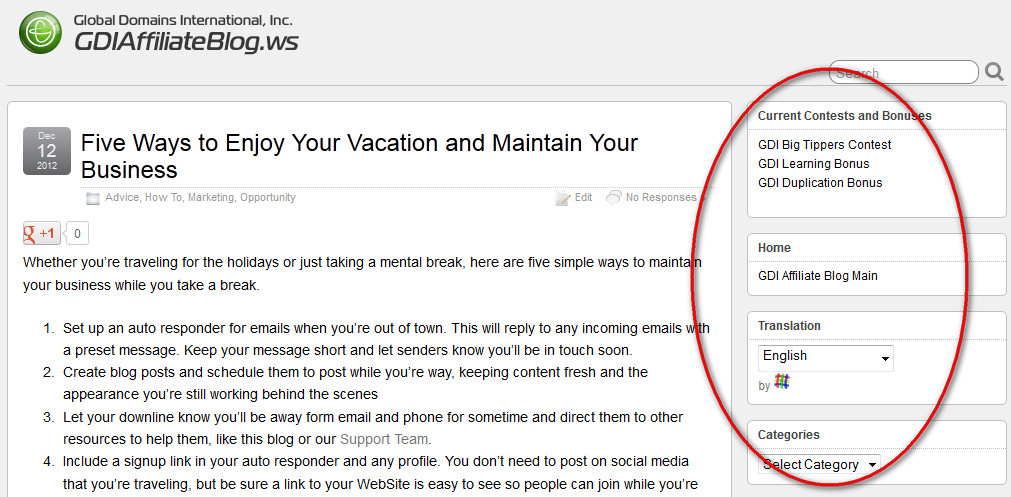
What is a widget? It’s WordPress’s name for any special feature you can add, adjust, or tweak within their platform. Examples of widgets might be a calendar, a drop down list of categories for your posts or just space for some HTML coding. The GDI Affiliate Blog takes advantage of widgets—everything you see on the right-hand side of the blog is a widget from past posts to our current Facebook feed. Some blog themes have widgets already built into them. To see what widgets you have, add more and edit them, log in to you blog and navigate then to Appearance>Widgets.

For a more in-depth explanation of adding a widget, see our video tutorial on it HERE.

Scheduling

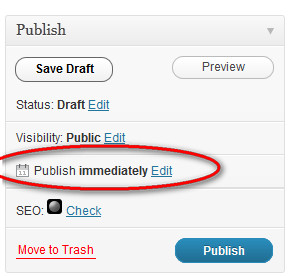
WordPress allows you to create posts and set when you would like to publish them. If you’re going to be away from your blog or just like to stick to a schedule, you simply edit the date and time when you would like you new post to go live. Then click “Schedule” which will appear in place of “Publish” and your post will be waiting in the queue ready to go on your set date.

 Easy Embedding

Embedding YouTube videos into your WordPress posts is very easy, and requires no HTML knowledge. To add a YouTube video to a post, navigate to the video you wish to add on YouTube. Then click Share>Embed just below it. A code will appear in a box, copy that code. Now head back to the post you’re creating and click the HTML tab at the top of the edit window. Now paste your code where you would like it to appear in the text. Update your post to save it and preview. Your video will be embedded and ready to play.

What WordPress features are you favorite?