Combining GDI’s Marketing Tools with Social Media

GDI gives you the marketing tools to build your business and generate Income for Life. Social media allows you to take many of these tools one step further. Learn how you can combine GDI’s marketing tools with social media to share your business with new networks and build your downline.

Your Website and Social Sharing

Your website can be your ultimate marketing tool. It is the place you can share information about yourself, your business and how to get started with GDI. Building a functional site is key, but after that it’s all about how you share it. A great site doesn’t matter if no one is seeing it. That’s why it’s important to share your site on your social networks. You can simply add you site address to your profile information on Facebook, Twitter, YouTube and LinkedIn. You of course can also share your site in tweets and updates when you’ve got great content to share. Encourage more visitors and views to your site by adding a ShareThis button, giving anyone who visits your site the power to share it with a click of a button.

The Inviter and Facebook and Twitter

The Inviter is a great tool to share your website with your current contacts. If you’re a basic member, simply input the email addresses of people you would like to check out your page and learn more and GDI does the rest of the work for you. Ev

en better if you’re a premium member, the Inviter can grab email addresses right from your personal email account, allow you to decide which people you want to invite and send the emails out for you. When it comes to social networking, the Inviter can help you compose a post for Facebook or a tweet inviting everyone to check out your website, instantly.

Webinars, Videos and Social Media

GDI knows the power of video, which is why our 7 Minute Movie is a great way to market your opportunity. We also share many other videos from webinars to tutorials, you can find what you need in video form from GDI. If you find one of our videos helpful, why not share it? Click the “share” button at the bottom of any of our videos to share on Facebook, Twitter or wherever you like.

Social Sharing

Social media is designed for sharing, whether you’re sharing a news story, pictures, or you’re your location, there’s a site or an app to help you do that. That’s why social media is a perfect fit for affiliate marketing where you are always sharing your opportunity. Take advantage of social media and social sharing.

Facebook Sharing

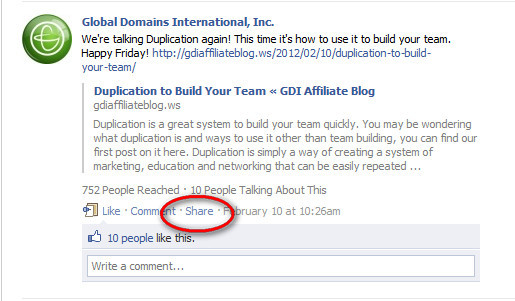
Facebook has recently unveiled a new feature that allows you to quickly share status updates, photos and links that you or someone else has posted. When you share a great post or a good link, encourage people to click that little button to share it with their friends, giving your more exposure and more traffic. Likewise, don’t be afraid to share a great post by someone else. If you see something helpful, share it!

Share Button for WordPress

You see it at the end of every single one of our blog posts: it’s the ShareThis button. This is a WordPress plugin that you can easily add allowing others to share your content. When you install the plugin, it will automatically populate the Share This button at the bottom of each of your blog posts. With ShareThis, your visitors can easily link to and share you blog post on Facebook, Twitter, through email or any number of social bookmarking sites. It makes sharing easy and takes a few minutes to install and seconds to use.

Share Videos

Video is important to affiliate marketing as we’ve talked about here and here. So why not share your video you’ve spent time making. YouTube allows you to share videos simply with their share button. You can even easily embed videos to your website, just click share and an embed link will appear. You can share any video, so if you see a great webinar you want to share with your time, simply click share to get the short link.

Your Webinar Questions and Answers from February 14th

Here are answers to your questions from our February 14th webinar.

Q: You talk about creating buzz for your website or opportunity, what is buzz?

A: For our international customers, the use of some of our slang words can be a bit confusing. When we use the word “buzz” we’re referring to generating interest. Creating buzz is another way of saying you are creating interest.

Q: I am new to this, what exactly is SEO?

A: SEO stands for search engine optimization. Very simply, it refers to using certain tactics and techniques to ensure your website comes up high in search results that are related to you. Learn a few simple SEO tips at this post.

Q: Do I have to login with my user name to attend the webinar?

A: No. Once you are registered for the webinar (register here: www.register.gdiwebinars.ws) you will receive a reminder email about the webinar with a link. Click that link and you should be taken directly to the webinar and ready to go.

Q: What happens if my upline leaves GDI?
A: The downline will be compressed and you will now have your upline’s previous sponsor. Compression occurs when users cancel so that there aren’t empty levels keeping affiliates from getting paid 5 levels. You can always check Members Area>Upline to see who your upline is.

Q: I am not sure if I am still active with GDI. How can I find out?
A: You can always try to log in to your Members Area to find out; if you can’t you can call support at 760-602-3000

Q: What is an example of a .ws site built with WordPress?

A: The very site you are on right now. Our blog is built and maintained on a .ws domain using WordPress.

Q: Is there a way I can see the webinar if I am not able to attend?

A: Yes! you can view all past webinars at www.gdiwebinars.ws